
The Ultimate Guide to Recognizing Phishing Emails
In the vast and interconnected digital landscape, a sinister shadow constantly lurks: phishing. This deceptive practice, designed to trick individuals into divulging sensitive information, poses a significant threat to personal and organizational security. Understanding how to identify and avoid these malicious emails is no longer a niche skill but a fundamental aspect of digital literacy. This comprehensive guide will equip you with the knowledge and tools to confidently navigate the murky waters of online communication, safeguarding your valuable data from the grasp of cybercriminals.
Contents
- 0.1 What is a Phishing Email?
- 0.2 Common Signs of a Phishing Email
- 0.3 Types of Phishing Emails
- 0.4 The Dangers of Falling for a Phishing Email
- 0.5 Tips for Avoiding Phishing Emails
- 0.6 How to Report a Phishing Email
- 0.7 Examples of Phishing Emails
- 0.8 Protecting Yourself from Phishing Attacks
- 0.9 Resources for Learning More about Phishing Emails
- 1 FAQs
What is a Phishing Email?
At its core, a phishing email is a fraudulent communication disguised as a legitimate one, typically originating from a trustworthy source. Its primary objective is to deceive recipients into performing an action that benefits the attacker, often leading to the theft of personal information, financial credentials, or the installation of malware. Think of it as a digital wolf in sheep’s clothing, meticulously crafted to mimic the appearance and even the tone of a reputable entity.
The Deceptive Art of Impersonation
Phishing emails rely heavily on impersonation. They might pretend to be from your bank, a popular social media platform, your email provider, a government agency, a shipping company, or even a colleague. The creators of these emails leverage familiarity and trust to lower your guard, making you more susceptible to their schemes. The more convincing the impersonation, the higher the chance of success for the attacker. This is why threat actors meticulously research their targets, often drawing information from publicly available sources or past data breaches to make their impersonations even more believable.
The Call to Action
Every phishing email, regardless of its specific target, ultimately aims to elicit a specific action from the recipient. This could be clicking on a malicious link, downloading an infected attachment, replying with sensitive information, or even calling a fraudulent phone number. The urgency and manufactured crisis within the email are often designed to pressure the recipient into acting without adequate contemplation, further increasing the attacker’s chances of success. The attacker’s goal is to bypass critical thinking and trigger an instinctual response.
Common Signs of a Phishing Email
While phishing emails are becoming increasingly sophisticated, several tell-tale signs often betray their malicious intent. Developing a keen eye for these indicators is your first line of defense.
Suspicious Sender Details
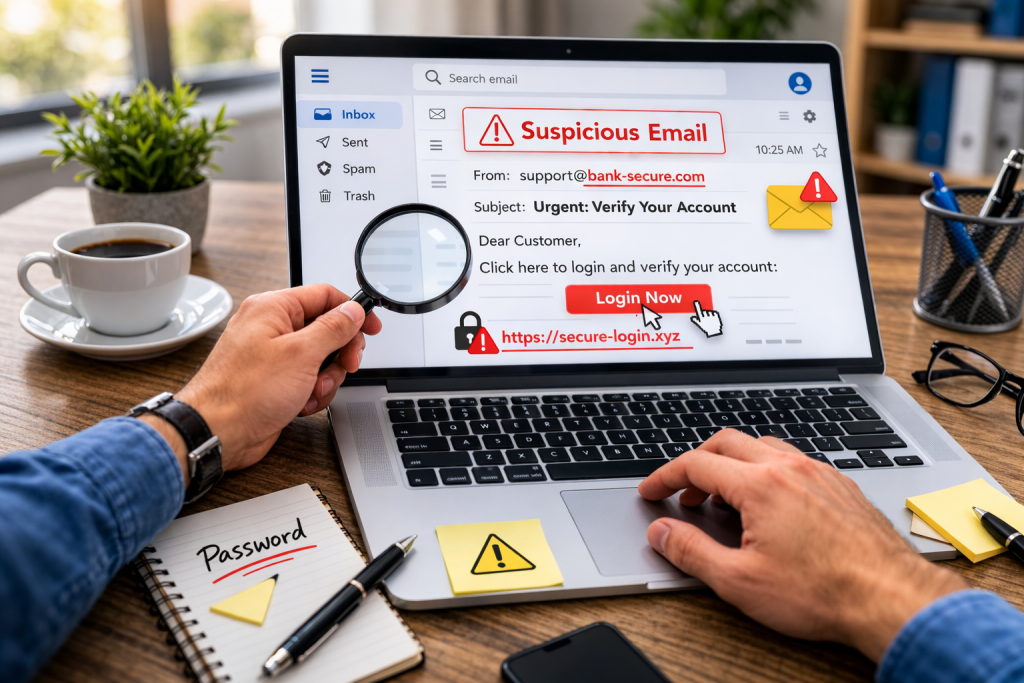
One of the most immediate red flags is the sender’s email address. While the sender’s name might appear legitimate, a closer inspection of the actual email address often reveals discrepancies. Look for misspellings, unusual domain names (e.g., “bankofamerica-support.com” instead of “bankofamerica.com”), or a long string of seemingly random characters. Sometimes, the sender’s address might even be a legitimate email that has been compromised, making it harder to spot, but still often accompanied by other suspicious elements.
Generic Greetings and Urgent Language
Legitimate organizations generally address customers by their name. Phishing emails, however, frequently employ generic greetings such as “Dear Customer,” “Dear Valued User,” or “Hi There.” This is because the attackers often send these emails in bulk and don’t have access to individual names. Coupled with this, you’ll often find a sense of manufactured urgency, demanding immediate action to avoid account suspension, financial penalties, or a missed delivery. This psychological tactic aims to create panic and bypass rational thought.
Poor Grammar and Spelling
While not a foolproof indicator, many phishing emails, especially those originating from less sophisticated sources, contain noticeable grammatical errors, awkward phrasing, and spelling mistakes. Legitimate organizations typically employ professional communication teams who meticulously review their outgoing messages. A proliferation of such errors should immediately raise your suspicions. However, it’s crucial to note that more advanced phishing campaigns can be grammatically flawless, so this sign should be considered in conjunction with others.
Unusual Links and Unexpected Attachments
Before clicking on any link in an email, always hover your mouse cursor over it (without clicking). This will display the actual URL it links to. If the displayed URL doesn’t match the context of the email or contains suspicious elements, do not click it. Similarly, be extremely cautious of unexpected attachments, especially those with unusual file extensions (.exe, .zip, .js, .scr). Even seemingly innocuous document types like PDFs or Word files can harbor malicious code. If you weren’t expecting an attachment, verify its legitimacy through an alternative communication channel.
Types of Phishing Emails
Phishing is not a monolithic threat; it manifests in various forms, each with its own nuances and targets. Understanding these different types can help you anticipate and defend against them.
Spear Phishing
Unlike generic phishing attacks, spear phishing is highly targeted. Attackers meticulously research their victims, gathering personal information to craft emails that appear exceptionally legitimate and relevant. They might reference specific projects, relationships, or recent events to build trust and increase the likelihood of success. Executives and individuals with access to sensitive data are frequently targets of spear phishing attacks due to the potential for significant financial or data gain.
Whaling
Whaling is a specialized form of spear phishing that targets high-profile individuals within an organization, such as CEOs, CFOs, or other senior executives. The goal is often to authorize large financial transactions or divulge confidential company information. These emails are typically sophisticated, mimicking internal communications and often exploiting the busy schedules and trust placed in senior leadership.
Smishing and Vishing
While traditional phishing occurs via email, its principles extend to other communication channels. Smishing refers to phishing via SMS text messages, often containing malicious links or requests for personal information. Vishing, or voice phishing, involves fraudsters making phone calls disguised as legitimate entities to solicit sensitive data. Both smishing and vishing leverage the same social engineering tactics as email phishing, relying on deception and manufactured urgency.
Clone Phishing
In clone phishing, attackers create an exact replica of a legitimate, previously delivered email. They then replace legitimate links or attachments with malicious ones and send it from a seemingly legitimate sender address. The victim, having seen the legitimate email before, is less likely to question the authenticity of the cloned version, making it a particularly insidious form of attack.
The Dangers of Falling for a Phishing Email
The consequences of succumbing to a phishing attack can be severe and far-reaching, impacting individuals and organizations alike.
Financial Loss and Identity Theft
One of the most immediate dangers is financial loss. Phishing emails often aim to steal banking credentials, credit card numbers, or other financial information, leading to unauthorized transactions or emptying bank accounts. Beyond direct financial theft, attackers can use stolen personal information to commit identity theft, opening new accounts, applying for loans, or even filing fraudulent tax returns in your name, causing long-term financial and legal headaches.
Data Breaches and Malware Infections
If a phishing email successfully tricks you into clicking a malicious link or downloading an infected attachment, it can lead to a data breach. This means your personal and sensitive information, or even an entire organization’s data, could be compromised and exposed. Furthermore, clicking on malicious links can silently download malware onto your device, including ransomware, spyware, or keyloggers, which can encrypt your files, monitor your activities, or steal further credentials without your knowledge.
Reputational Damage
For businesses, falling victim to a phishing attack can result in significant reputational damage. Customers may lose trust if their data is compromised, leading to a decline in business and long-term recovery efforts. Individuals can also suffer reputational harm if their compromised accounts are used to perpetrate further scams or spread malicious content.
Tips for Avoiding Phishing Emails
Proactive measures and a skeptical mindset are your best defenses against phishing attacks.
Think Before You Click
This is arguably the most crucial tip. Always pause and critically evaluate any email before clicking on links, opening attachments, or replying with sensitive information. Ask yourself: “Is this email expected? Does it make sense? Does anything feel off?” A moment of skepticism can save you from a major cybersecurity headache.
Verify the Sender
Check the sender’s email address carefully. If it looks even slightly suspicious, do not proceed. If in doubt, contact the alleged sender directly using a known, legitimate contact method (e.g., a phone number from their official website, not from the email itself) to verify the email’s authenticity. Never reply directly to a suspicious email to verify its legitimacy.
Use Strong, Unique Passwords and Multi-Factor Authentication
Even if your credentials are compromised through a phishing attempt, strong, unique passwords for each online account will limit the damage. Multi-factor authentication (MFA), which requires a second form of verification (like a code from your phone) in addition to your password, provides an indispensable layer of security, making it exponentially harder for attackers to gain access.
Keep Software Updated
Ensure your operating system, web browser, and antivirus software are always up to date. Software developers frequently release updates that patch security vulnerabilities, which attackers often exploit. Regular updates provide essential protection against known phishing techniques and malware.
Educate Yourself and Others
Stay informed about the latest phishing trends and tactics. The more you understand how these attacks work, the better equipped you will be to recognize and avoid them. Share this knowledge with colleagues, friends, and family to create a more cyber-resilient community.
How to Report a Phishing Email
Taking action when you encounter a phishing email not only protects you but also helps others and contributes to a safer online environment.
Utilize Your Email Provider’s Reporting Features
Most email providers (Gmail, Outlook, Yahoo Mail, etc.) have built-in features to report phishing emails. Look for options like “Report Phishing,” “Mark as Spam,” or “Report Security Phishing.” Reporting these emails helps your provider identify and block similar attacks in the future.
Forward to Anti-Phishing Organizations
In the United States, you can forward phishing emails to the Anti-Phishing Working Group (APWG) at reportphishing@apwg.org. In the UK, you can forward suspicious emails to the National Cyber Security Centre (NCSC) at report@phishing.gov.uk. These organizations collect and analyze phishing attempts to track trends and raise public awareness.
Contact the Impersonated Organization
If a phishing email is impersonating a specific organization (e.g., your bank, a well-known retailer), it’s a good idea to report the incident directly to that organization’s security or fraud department. They can take steps to warn their customers and take legal action against the attackers.
Examples of Phishing Emails
While specific examples change rapidly, understanding common themes and approaches can help identify them.
“Account Locked” or “Suspicious Activity” Messages
These often state that your account has been locked or that suspicious activity has been detected, urging you to click a link to “verify” your identity or “unlock” your account. The sense of urgency and fear of losing access is a powerful motivator.
“Invoice” or “Payment Due” Notices
Emails pretending to be invoices for services you didn’t order or demanding immediate payment for a fictitious bill are common. These often contain malicious attachments disguised as invoice details.
“Shipping Notification” Scams
During peak shopping seasons, emails purporting to be from shipping companies (FedEx, UPS, DHL) are prevalent. They might claim there’s an issue with your delivery and ask you to click a link to reschedule or update delivery details, leading to a malicious site.
“Password Reset” Requests
Attackers often send fake password reset emails, hoping you’ll click the link and unwittingly provide your current credentials on a fraudulent website, allowing them to take over your account.
Protecting Yourself from Phishing Attacks
A multi-layered approach to security is the most effective defense against the ever-evolving threat of phishing.
Implement Email Security Solutions
For businesses, robust email security gateways can filter out many phishing attempts before they even reach employee inboxes. These solutions often employ advanced threat detection, spam filtering, and sandboxing technologies. Individuals should leverage the built-in security features of their email providers and consider third-party antivirus software with email scanning capabilities.
Regular Security Awareness Training
The human element is often the weakest link in the security chain. Regular, engaging security awareness training for employees and personal education for individuals are vital. This training should cover the latest phishing tactics, how to recognize red flags, and proper reporting procedures.
Backup Your Data
In the unfortunate event that a phishing attack leads to a malware infection, particularly ransomware, having regular backups of your important data can be a lifesaver. This allows you to restore your files without succumbing to attacker demands.
Trust Your Instincts
If an email feels “off,” it probably is. Your intuition can be a powerful tool in identifying suspicious communications. Don’t let curiosity or urgency override your common sense. Always err on the side of caution.
Resources for Learning More about Phishing Emails
The fight against phishing is ongoing, and staying informed is key.
Government Cybersecurity Agencies
In the United States, resources from the Cybersecurity and Infrastructure Security Agency (CISA) and the Federal Trade Commission (FTC) offer valuable information and alerts. Similar agencies exist in other countries, such as the NCSC in the UK and cybersecurity agencies in Australia and Canada.
Reputable Cybersecurity Blogs and Websites
Follow well-known cybersecurity blogs and news outlets. These often provide timely updates on new phishing campaigns, emerging threats, and best practices for protection. Organizations like KrebsOnSecurity, BleepingComputer, and the Electronic Frontier Foundation (EFF) are excellent sources.
Online Cybersecurity Courses
Many online platforms offer free or paid courses on cybersecurity basics, including modules dedicated to phishing awareness. These can provide a structured learning environment to deepen your understanding and enhance your digital defense skills.
By internalizing the principles discussed in this guide, you can transform from a potential victim into a formidable opponent against the pervasive threat of phishing, protecting your digital life and contributing to a safer online world.
FAQs
1. What is a Phishing Email?
A phishing email is a type of cyber attack where the attacker impersonates a legitimate entity to trick the recipient into revealing sensitive information, such as passwords, credit card numbers, or personal information.
2. Common Signs of a Phishing Email
Common signs of a phishing email include generic greetings, urgent requests for personal information, misspelled words or poor grammar, suspicious links or attachments, and requests for financial information.
3. How to Spot a Phishing Email
To spot a phishing email, carefully examine the sender’s email address, look for generic greetings, check for spelling and grammar errors, hover over links to see the actual URL, and verify the legitimacy of the request before taking any action.
4. Types of Phishing Emails
There are several types of phishing emails, including spear phishing (targeted attacks on specific individuals or organizations), vishing (phishing via phone calls), smishing (phishing via text messages), and clone phishing (duplicating a legitimate email with malicious content).
5. Tips for Avoiding Phishing Emails
To avoid phishing emails, use spam filters, be cautious of unsolicited requests for personal information, verify the legitimacy of emails before clicking on links or opening attachments, and educate yourself and others about the dangers of phishing attacks.

About the Author
Maya Ali is the founder of ByteSolving with experience in technology and digital solutions. His mission is to make technology easier to understand and help people solve everyday tech problems in a simple and practical way.